

As more ISVs expand beyond SaaS and bring containerised applications to Microsoft Marketplace, managing different product types shouldn’t require different operational workflows.
Until now, Microsoft SaaS products could be managed through Labra, while container products remained outside that workflow. Teams had to rely on Partner Center to manage container listings and related marketplace operations, creating fragmented processes for organisations selling both SaaS and container solutions.
That changes today.
Microsoft container listings are now supported in Labra, allowing ISVs to manage their Microsoft Marketplace catalogue from a single platform. Alongside listing management, teams can also create and manage container private offers directly within the same workflow.
The result is a more consistent experience for marketplace operations, regardless of product type.
Why Does This Matter?
Container adoption continues to grow across infrastructure, security, AI, and developer tooling. Many ISVs now offer a mix of SaaS and container products on Microsoft Marketplace, but until now, those products couldn’t be managed in the same way.
This meant teams often had to split their marketplace operations:
- SaaS products managed through Labra
- Container products managed separately in Microsoft Partner Center
While neither workflow was inherently difficult, maintaining two different processes added unnecessary operational overhead. Marketplace teams had to switch between systems, sales operations lost a single view of marketplace activity, and internal processes became more complex as product portfolios expanded.
Supporting container listings inside Labra brings those workflows together.
Manage Microsoft Container Listings from Labra
With this release, existing Microsoft container products can now be brought into Labra and managed alongside SaaS products.
Instead of maintaining separate operational processes for different product types, marketplace teams can work from a single platform for their Microsoft Marketplace operations.
This creates a more consistent experience across listing management, marketplace administration, and customer-specific commercial workflows.
How To Create A Container Private Offer via Labra
Step 1: Log in to your Labra dashboard and navigate to Marketplace > Offers
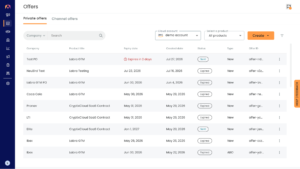
Step 2: Here, you can go ahead and create a Private offer by selecting the following options
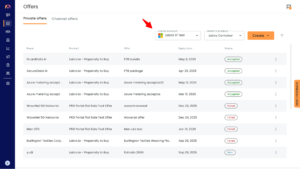
Step 3: On the top right, click on the “Create” offer. Here you will then be redirected to this page. Enter all the details you can
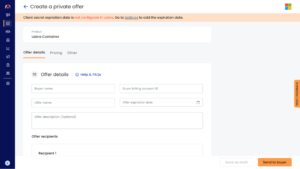
Step 4: Enter your purchase terms and configure your pricing
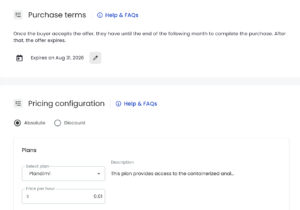
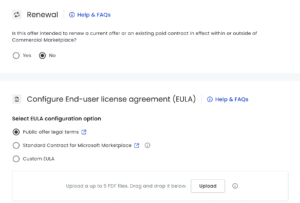
Step 5: Select the following options to select your renewal dates for the offer and EULA.
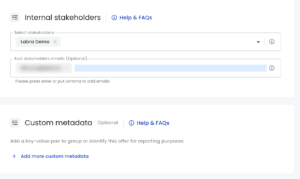
Step 6: The last step is to select internal stakeholders to help manage this offer and upload custom metadata if any.
Step 7: You can then either proceed to save it as draft or send it to the buyer as per your preferences.

And that’s how you can easily create a private Container Offer on Labra.
Who Benefits Most?
ISVs with Mixed SaaS and Container Portfolios
Teams managing multiple product types no longer need different operational workflows depending on what they’re selling. Listing management and private offers now follow a consistent experience inside Labra.
Container-First ISVs
For organisations selling only container products, marketplace management moves beyond a Partner Center-only workflow into a platform designed to centralise marketplace operations.
Marketplace Operations and RevOps Teams
A single platform makes it easier to understand what’s happening across Microsoft Marketplace, reducing manual tracking and simplifying operational processes as marketplace activity grows.
Sales Teams
Once commercial terms have been agreed with a customer, private offers can be created and managed within the same platform where marketplace operations already live, helping reduce unnecessary handoffs.
What changed with Labra’s container private offer support
The update brings container private offerings into the same workflow ISVs already use for SaaS, inside Labra, rather than asking sellers to keep two systems running.
Migrating existing container products
The first piece is migration. ISVs with container products already published on Microsoft marketplace can move them into Labra, rather than starting from scratch. This matters for existing customers in particular, teams that already run their SaaS private offers through Labra can bring their container catalog into the same environment without duplicating setup work.
Creating and pricing offers directly
Once a container product is in Labra, offer creation follows the same shape as SaaS: select the product, set customer-specific pricing, and submit the offer to Microsoft marketplace. Custom pricing per offer works the same way it already does for SaaS private offers, so teams are not learning a new pricing model, just applying a familiar one to a product type that did not previously support it here.
Tracking status through approval
Offers can be tracked through their full lifecycle, from submission through Microsoft’s approval process to customer acceptance, inside the same tracker used for SaaS offers. That is arguably the most operationally useful part of this update. Status visibility was the piece most dependent on someone manually checking Partner Center before. Now it sits in the same place as everything else.